

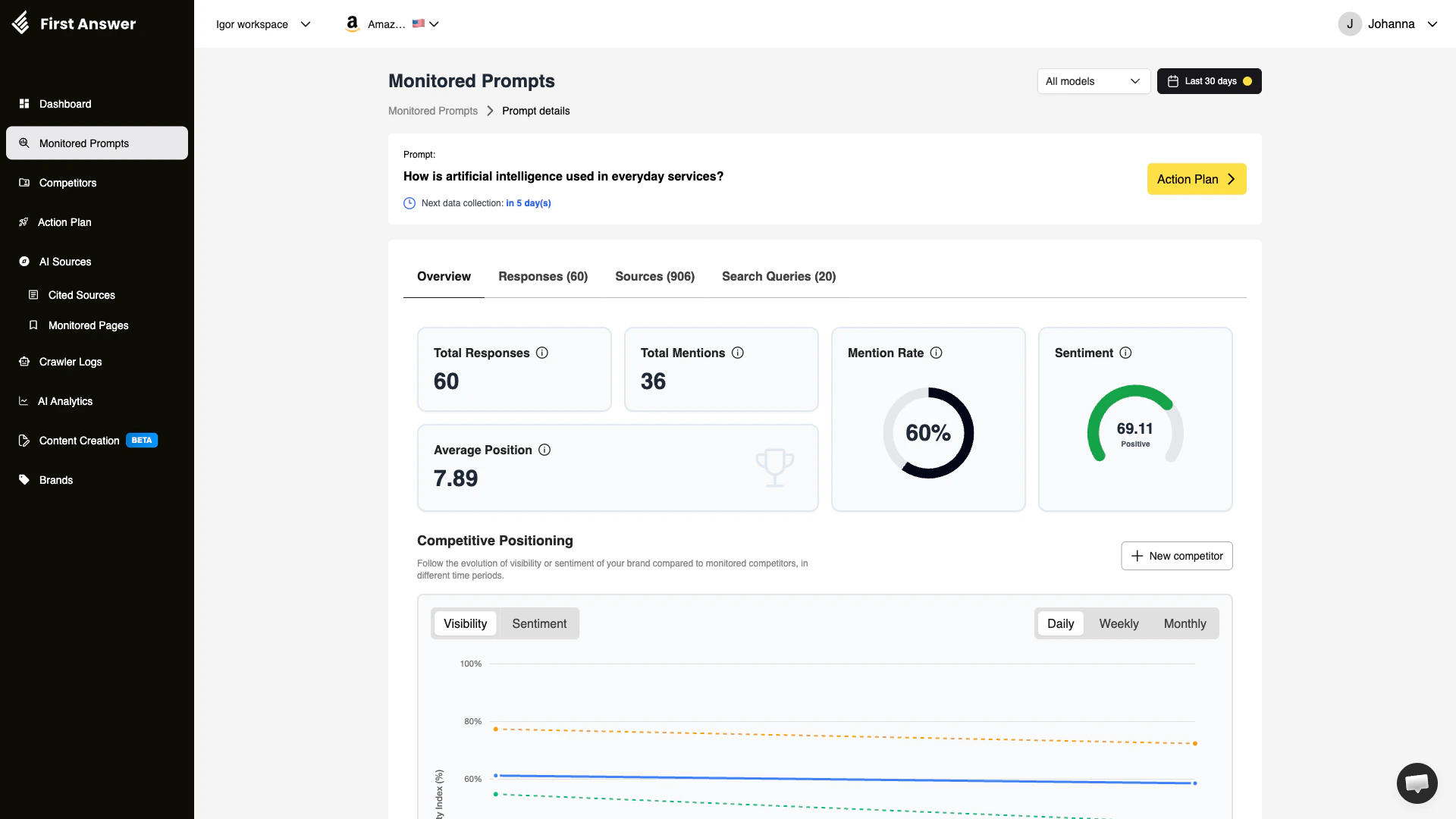
What is the Prompt Details page?
The Prompt Details page gives you a full breakdown of how a single monitored prompt performs across all AI models over time. While the Monitored Prompts list gives you a high-level overview, this page lets you go deeper — investigating every response collected, every source cited, and every search query that AI models used when generating answers. Think of it as your investigation hub for one specific question: exactly when, how, and why your brand appears (or doesn’t) in AI-generated answers.Key metrics
Total Responses
The total number of AI-generated responses collected for this prompt across all tracked models and collection cycles. Because each prompt runs against multiple AI models on a regular schedule, this number grows over time.Total Mentions
How many of those collected responses specifically mentioned your brand. Combined with Total Responses, this gives you the raw data behind your Mention Rate.Mention Rate
The percentage of responses that include your brand:Sentiment
How positively or negatively AI models describe your brand in responses to this specific prompt. Scores range from 0 to 100:- 60–100: Positive / Very Positive
- 40–60: Neutral
- 0–40: Negative
Average Position
When AI models list multiple brands or options in a response, your brand’s position matters. Average Position tracks where your brand typically falls in those ranked lists:- 1: First mentioned — highest authority signal
- 2–3: Strong presence
- 4+: Mentioned but not a top recommendation
Next data collection
The countdown below the prompt text shows when First Answer will next run this prompt against all AI models. Prompts are collected on a regular cadence so you always have fresh data.Tabs
The detail page has four tabs that break down different angles of the data:Overview tab
The Overview tab includes the Competitive Positioning chart, which plots your brand’s visibility or sentiment against any tracked competitors over time. Toggle between:- Visibility: How often each brand appears in responses
- Sentiment: How positively each brand is described
Responses tab
See the raw AI outputs collected for this prompt. Each response shows which AI model produced it, the date it was collected, and whether your brand was mentioned. This is invaluable for understanding the exact language AI models use when describing your brand.Sources tab
AI models like Perplexity and Google AI Mode cite web sources when answering questions. The Sources tab shows which URLs and domains were cited in responses to this prompt. Domains that consistently appear here have significant influence over what AI models say about this topic — and about your brand.Search Queries tab
Some AI models perform live web searches before generating responses. The Search Queries tab reveals exactly what search terms these models used. This data helps you understand what content you need to rank for in order to influence the AI’s answer.Action Plan
The Action Plan button in the top-right corner takes you to a recommended action plan for improving this prompt’s performance. First Answer analyzes the responses, sources, and your brand’s positioning, then suggests concrete content and SEO actions to increase your visibility.How to use the Prompt Details page
1
Check your Mention Rate and Position
Start with the summary metrics. A high mention rate with a low position means you’re being mentioned but not as the top recommendation — work on authority signals for this topic.
2
Review the Competitive Positioning chart
Toggle between Visibility and Sentiment to understand how your brand compares. If a competitor has higher visibility, switch to the Sources tab to see what content they’re getting cited from.
3
Read actual Responses
Click the Responses tab and read how AI models describe your brand. If the language is neutral or negative, note the specific phrasing — that’s what you need to counter with better content.
4
Investigate cited Sources
Go to the Sources tab. If high-authority domains are frequently cited but your brand isn’t on those pages, that’s a clear content gap. Contribute to or appear on those sources.
5
Analyze Search Queries
Use the Search Queries tab to find the exact terms AI models search when answering this prompt. These are keywords you should target in your content strategy.
6
Take action
Click Action Plan to get specific, AI-generated recommendations for improving your performance on this prompt.