

What are Crawler Logs?
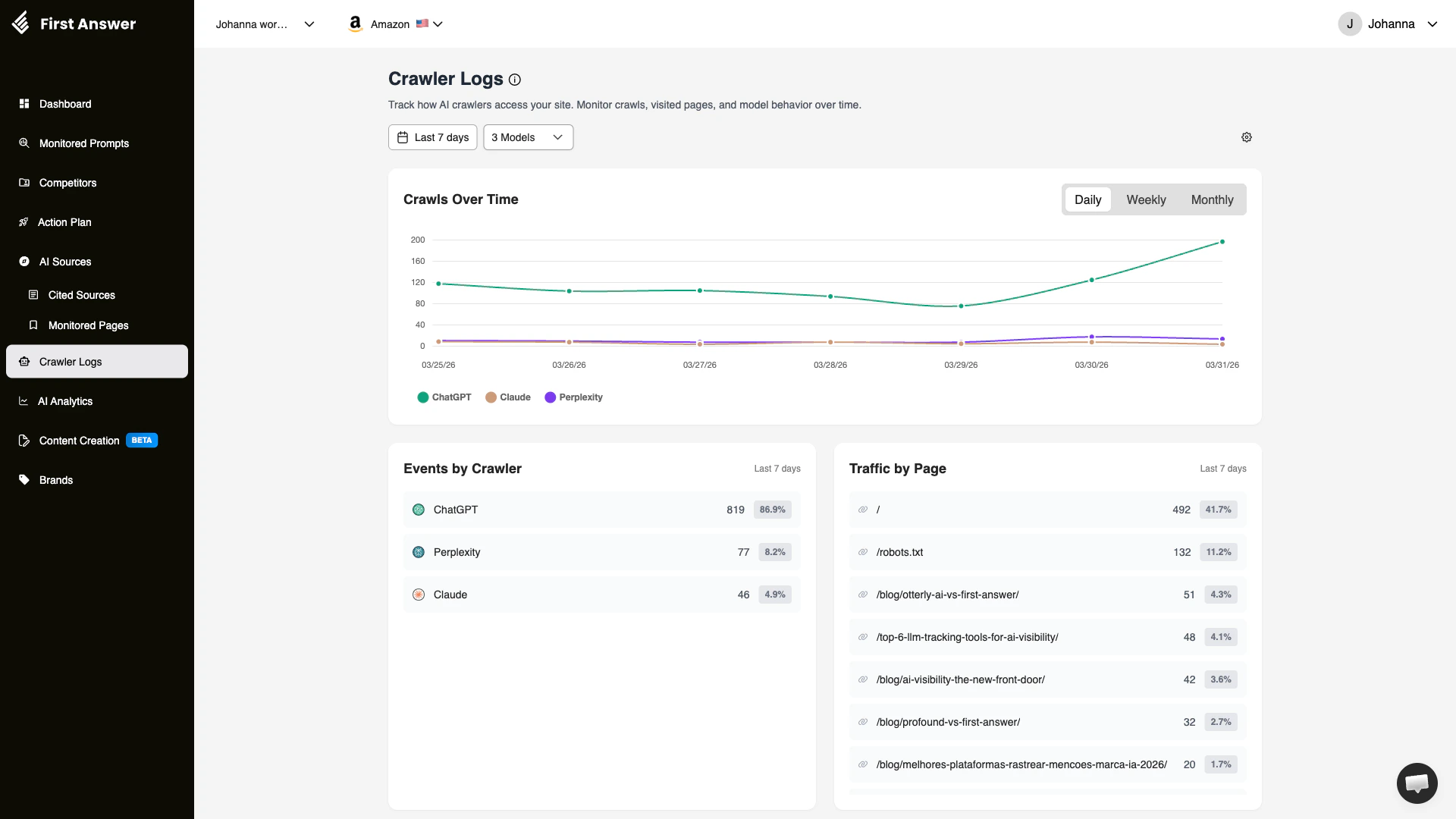
Crawler Logs tracks how AI model crawlers (bots) access and index your website. Just like search engine crawlers (Googlebot, Bingbot), AI models have their own crawlers that visit web pages to gather information. Understanding this crawl behavior is essential for optimizing your site’s AI visibility. If AI crawlers are not visiting your key pages, AI models may not have up-to-date information about your brand — which directly impacts your visibility in AI-generated responses.How it works
First Answer integrates with your website’s server logs or analytics to detect visits from known AI crawlers. It then categorizes and visualizes this activity so you can understand:- How often each AI model crawls your site
- Which pages they visit most frequently
- How crawl patterns change over time
Dashboard sections
Crawls Over Time
A time-series chart showing the total number of crawl events per day, week, or month. You can toggle between Daily, Weekly, and Monthly views. Each AI model is represented by a different color, making it easy to see which models are most actively crawling your site.Events by Crawler
A breakdown of total crawl events by AI model. This shows:- Crawler name: The AI model’s crawler (e.g., ChatGPT, Perplexity, Claude)
- Event count: Total number of crawl events in the selected period
- Percentage: The crawler’s share of total crawl activity
ChatGPT’s crawler (GPTBot) is typically the most active, but crawl patterns vary by site. If a specific crawler is not visiting your site, check your
robots.txt to ensure you are not blocking it.Traffic by Page
Shows which pages on your site receive the most crawl traffic from AI bots. This reveals:- Page URL: The specific page being crawled
- Visit count: How many times the page was crawled
- Percentage: The page’s share of total crawl visits
Filters
- Date range: Default is last 7 days, but you can adjust to see longer trends
- Models: Filter by specific AI model crawlers
Key concepts
Why crawl frequency matters
AI models can only include information from pages they have crawled. If a crawler hasn’t visited your page recently, the AI model may not know about:- New products or services you’ve launched
- Updated pricing or features
- Recent blog posts or content
robots.txt and AI crawlers
Yourrobots.txt file controls which crawlers can access your site. Some websites unintentionally block AI crawlers. Key AI crawler user agents include:
Page prioritization
AI crawlers don’t visit all pages equally. They prioritize pages based on:- Authority: Pages with more inbound links get crawled more often
- Freshness: Recently updated pages may be re-crawled sooner
- Sitemap inclusion: Pages listed in your sitemap are easier for crawlers to discover
- Internal linking: Well-linked pages get crawled more frequently
How to use Crawler Logs
1
Verify AI crawlers can access your site
Check that your
robots.txt does not block AI crawler user agents. If you see zero crawl events for a specific model, this is likely the issue.2
Identify your most-crawled pages
Review the Traffic by Page section. Your most important pages (product pages, key landing pages) should be among the most frequently crawled.
3
Monitor crawl trends
Use the Crawls Over Time chart to spot changes in crawl behavior. A sudden drop may indicate a technical issue (blocked in robots.txt, server errors, or site downtime).
4
Optimize underperforming pages
If important pages are not being crawled, improve their discoverability through internal linking, sitemap inclusion, and fresh content updates.