> ## Documentation Index
> Fetch the complete documentation index at: https://docs.firstanswer.ai/llms.txt
> Use this file to discover all available pages before exploring further.
# Monitored Prompts
> Track how your brand appears in AI-generated responses by monitoring specific questions and queries across multiple AI models.
 ## What are Monitored Prompts?
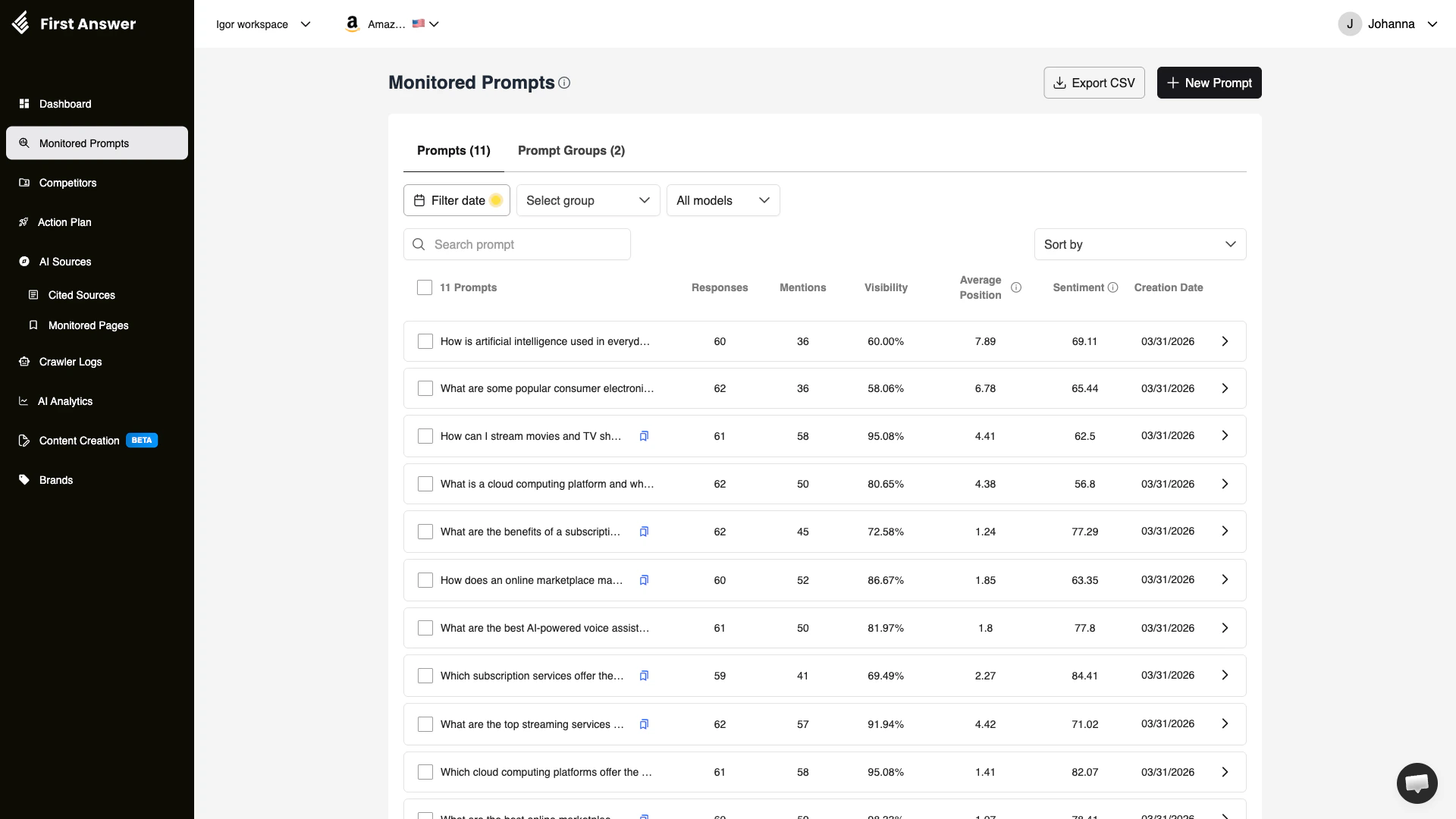
Monitored Prompts are the core of First Answer's tracking system. Each monitored prompt is a question or query — like *"What are the best CRM tools?"* or *"How do I improve my brand's AI visibility?"* — that First Answer periodically executes against multiple AI models to collect responses.
By monitoring these prompts, you can see exactly when and how AI models mention your brand, track changes over time, and identify opportunities to improve your visibility.
## How it works
1. You add a prompt (a question your target audience might ask an AI)
2. First Answer runs that prompt against all supported AI models on a regular schedule
3. Each response is analyzed for brand mentions, position, and sentiment
4. Results are aggregated and displayed in the Monitored Prompts table
## Understanding the table columns
| Column | Description |
| -------------------- | -------------------------------------------------------------------------------------------------- |
| **Prompt** | The question or query being tracked |
| **Responses** | Total number of AI-generated responses collected for this prompt |
| **Mentions** | How many of those responses mention your brand |
| **Visibility** | The percentage of responses that include your brand (mentions / responses) |
| **Average Position** | Where your brand typically appears in the response (1 = first mentioned, higher = mentioned later) |
| **Sentiment** | How positively or negatively AI models talk about your brand in responses to this prompt |
| **Creation Date** | When you started monitoring this prompt |
**Visibility vs. Mention Rate**: Visibility is calculated per prompt, while the Dashboard's mention rate is an aggregate across all prompts. A prompt with 5% visibility means your brand appears in 5% of all responses collected for that specific question.
## Key concepts
### Visibility score
Visibility measures how frequently your brand appears when AI models answer a specific question. A visibility score of 10% means that in 1 out of every 10 responses, the AI includes your brand.
Factors that influence visibility:
* **Content quality**: AI models pull from web content. High-quality, authoritative content about your brand improves mentions.
* **Source citations**: If AI models cite pages that mention your brand, you are more likely to appear.
* **Prompt relevance**: Broad prompts (e.g., "best software tools") may yield lower visibility than niche ones (e.g., "best AI visibility monitoring tools").
### Average position
When AI models produce lists or rankings, your brand's position matters. Being mentioned first carries more weight than being listed last. Average position tracks where your brand typically falls in these rankings.
* **1–3**: Strong position — your brand is among the first mentioned
* **4–10**: Moderate — your brand appears but is not the top recommendation
* **10+**: Weak — your brand is mentioned far down in the response
### Sentiment per prompt
Each prompt has its own sentiment score that reflects how AI models describe your brand when answering that specific question. This helps you identify prompts where your brand might be mentioned but in a negative context.
## Filters and search
You can narrow down your prompt list using:
* **Date range**: Filter by time period to see how metrics have changed
* **Group**: Filter by prompt group (if you organize prompts into categories)
* **AI model**: View results from a specific AI platform only
* **Search**: Search for specific prompts by keyword
* **Sort**: Order prompts by any column to find top or bottom performers
## Prompt groups
Organize your prompts into groups for easier management. Groups let you categorize prompts by topic, product line, market segment, or any other dimension that makes sense for your business.
Click **View Groups** at the top of the page to manage your prompt groups.
## How to use Monitored Prompts
Click **+ New Prompt** and enter questions your target audience might ask AI assistants. Think about questions related to your industry, product category, or brand.
Group your prompts by category (e.g., "Product Comparisons," "Industry Questions," "Brand-Specific") for easier analysis.
Check back regularly to see how your visibility changes. Sort by visibility to quickly find your best and worst-performing prompts.
For prompts where your brand does not appear, click into the prompt detail to see which competitors are mentioned instead. Use this insight to create content that targets those specific questions.
Click **Export CSV** to download your prompt data for further analysis or reporting.
Start with 10-20 prompts that are most relevant to your business. As you learn which types of questions drive the most valuable visibility, expand your prompt list strategically.
## What are Monitored Prompts?
Monitored Prompts are the core of First Answer's tracking system. Each monitored prompt is a question or query — like *"What are the best CRM tools?"* or *"How do I improve my brand's AI visibility?"* — that First Answer periodically executes against multiple AI models to collect responses.
By monitoring these prompts, you can see exactly when and how AI models mention your brand, track changes over time, and identify opportunities to improve your visibility.
## How it works
1. You add a prompt (a question your target audience might ask an AI)
2. First Answer runs that prompt against all supported AI models on a regular schedule
3. Each response is analyzed for brand mentions, position, and sentiment
4. Results are aggregated and displayed in the Monitored Prompts table
## Understanding the table columns
| Column | Description |
| -------------------- | -------------------------------------------------------------------------------------------------- |
| **Prompt** | The question or query being tracked |
| **Responses** | Total number of AI-generated responses collected for this prompt |
| **Mentions** | How many of those responses mention your brand |
| **Visibility** | The percentage of responses that include your brand (mentions / responses) |
| **Average Position** | Where your brand typically appears in the response (1 = first mentioned, higher = mentioned later) |
| **Sentiment** | How positively or negatively AI models talk about your brand in responses to this prompt |
| **Creation Date** | When you started monitoring this prompt |
**Visibility vs. Mention Rate**: Visibility is calculated per prompt, while the Dashboard's mention rate is an aggregate across all prompts. A prompt with 5% visibility means your brand appears in 5% of all responses collected for that specific question.
## Key concepts
### Visibility score
Visibility measures how frequently your brand appears when AI models answer a specific question. A visibility score of 10% means that in 1 out of every 10 responses, the AI includes your brand.
Factors that influence visibility:
* **Content quality**: AI models pull from web content. High-quality, authoritative content about your brand improves mentions.
* **Source citations**: If AI models cite pages that mention your brand, you are more likely to appear.
* **Prompt relevance**: Broad prompts (e.g., "best software tools") may yield lower visibility than niche ones (e.g., "best AI visibility monitoring tools").
### Average position
When AI models produce lists or rankings, your brand's position matters. Being mentioned first carries more weight than being listed last. Average position tracks where your brand typically falls in these rankings.
* **1–3**: Strong position — your brand is among the first mentioned
* **4–10**: Moderate — your brand appears but is not the top recommendation
* **10+**: Weak — your brand is mentioned far down in the response
### Sentiment per prompt
Each prompt has its own sentiment score that reflects how AI models describe your brand when answering that specific question. This helps you identify prompts where your brand might be mentioned but in a negative context.
## Filters and search
You can narrow down your prompt list using:
* **Date range**: Filter by time period to see how metrics have changed
* **Group**: Filter by prompt group (if you organize prompts into categories)
* **AI model**: View results from a specific AI platform only
* **Search**: Search for specific prompts by keyword
* **Sort**: Order prompts by any column to find top or bottom performers
## Prompt groups
Organize your prompts into groups for easier management. Groups let you categorize prompts by topic, product line, market segment, or any other dimension that makes sense for your business.
Click **View Groups** at the top of the page to manage your prompt groups.
## How to use Monitored Prompts
Click **+ New Prompt** and enter questions your target audience might ask AI assistants. Think about questions related to your industry, product category, or brand.
Group your prompts by category (e.g., "Product Comparisons," "Industry Questions," "Brand-Specific") for easier analysis.
Check back regularly to see how your visibility changes. Sort by visibility to quickly find your best and worst-performing prompts.
For prompts where your brand does not appear, click into the prompt detail to see which competitors are mentioned instead. Use this insight to create content that targets those specific questions.
Click **Export CSV** to download your prompt data for further analysis or reporting.
Start with 10-20 prompts that are most relevant to your business. As you learn which types of questions drive the most valuable visibility, expand your prompt list strategically.