> ## Documentation Index
> Fetch the complete documentation index at: https://docs.firstanswer.ai/llms.txt
> Use this file to discover all available pages before exploring further.
# Competitors
> Track and compare how competitor brands appear in AI-generated responses alongside your brand.
 ## What is Competitor Monitoring?
Competitor Monitoring lets you track how other brands appear in the same AI responses where your brand is (or should be) mentioned. By comparing your visibility, position, and sentiment against competitors, you can understand your relative standing in the AI landscape and identify strategic opportunities.
When AI models answer questions about your industry, they often mention multiple brands. Knowing which competitors appear — and how often — gives you actionable intelligence for improving your own AI visibility.
## How it works
When First Answer collects AI responses for your monitored prompts, it scans each response for mentions of your brand **and** all your tracked competitors. This means every data point you collect is also a data point for your competitive analysis.
## Filters
The controls at the top of the page apply to every tab:
* **AI model** — limit the analysis to a single model (for example only ChatGPT or only Gemini).
* **Groups** — focus on a specific prompt group.
* **Date range** — the time window for the data (defaults to **Last 30 days**).
## The three tabs
Competitors is organized into three tabs:
* **Visibility** — how your share of AI mentions trends over time and across models.
* **Comparisons** — head-to-head breakdowns of your brand against each competitor.
* **Manage** — add, edit, and curate the competitors and suggestions you track.
## Visibility
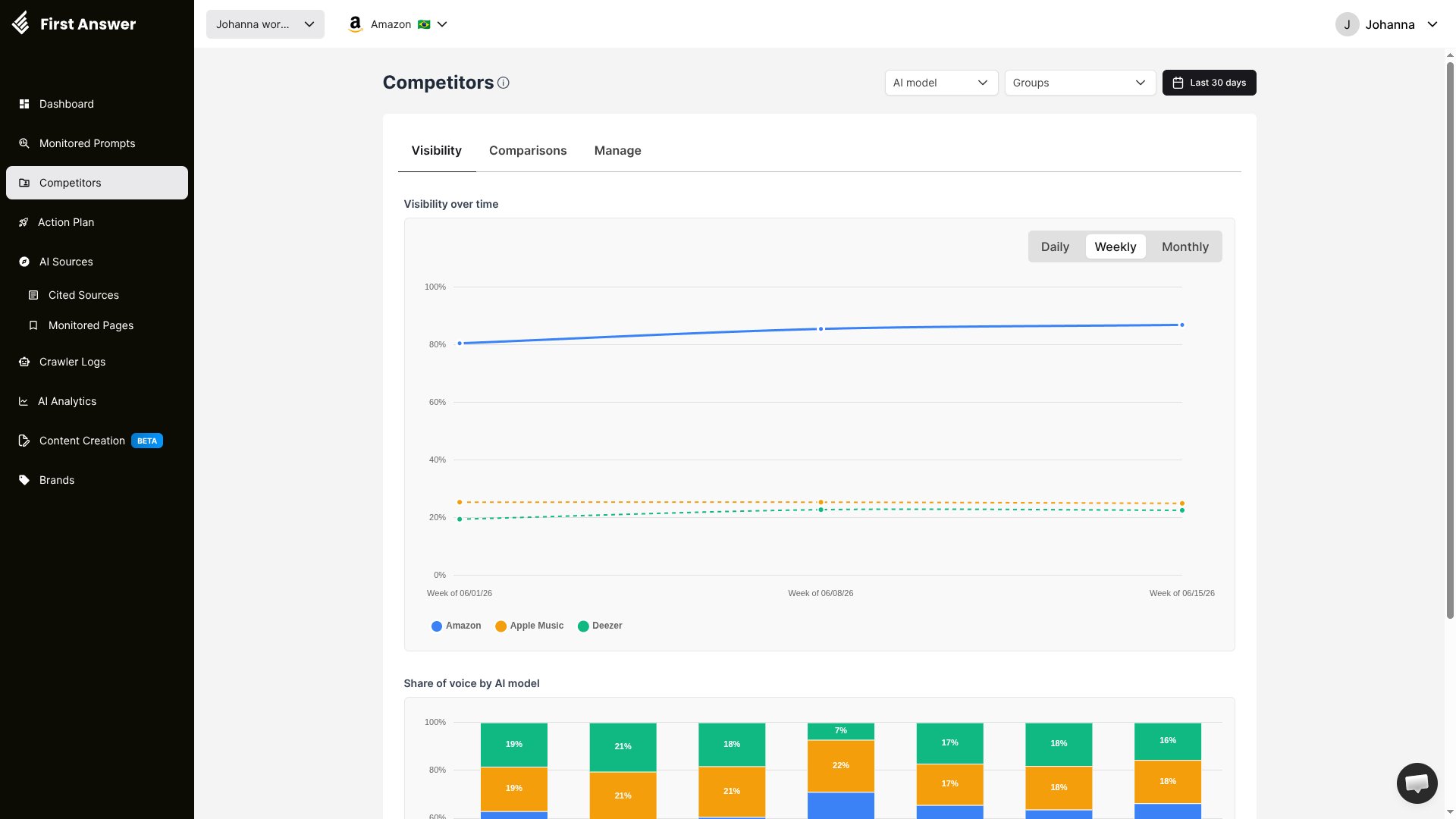
The **Visibility** tab shows how much of the AI conversation your brand owns compared to your competitors.
### Visibility over time
A line chart plots the visibility of your brand and each competitor over the selected period. Switch between **Daily**, **Weekly**, and **Monthly** granularity to spot trends and inflection points.
### Share of voice by AI model
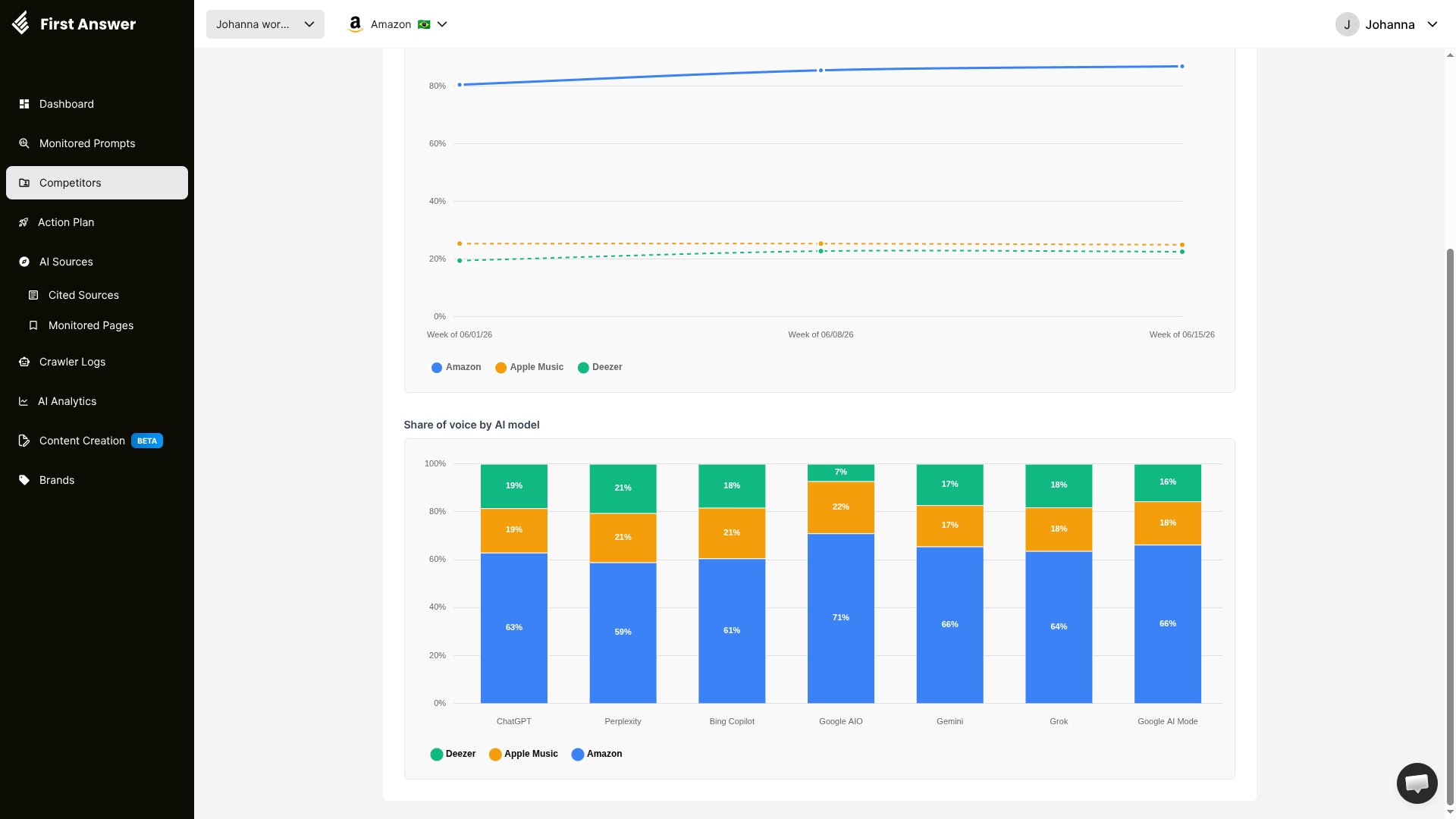
A stacked bar chart breaks down share of voice **per AI model** (ChatGPT, Perplexity, Bing Copilot, Google AIO, Gemini, Grok, and Google AI Mode). Each bar shows the percentage of mentions captured by your brand versus each competitor in that model, so you can see where you are strong and where a competitor dominates.
## What is Competitor Monitoring?
Competitor Monitoring lets you track how other brands appear in the same AI responses where your brand is (or should be) mentioned. By comparing your visibility, position, and sentiment against competitors, you can understand your relative standing in the AI landscape and identify strategic opportunities.
When AI models answer questions about your industry, they often mention multiple brands. Knowing which competitors appear — and how often — gives you actionable intelligence for improving your own AI visibility.
## How it works
When First Answer collects AI responses for your monitored prompts, it scans each response for mentions of your brand **and** all your tracked competitors. This means every data point you collect is also a data point for your competitive analysis.
## Filters
The controls at the top of the page apply to every tab:
* **AI model** — limit the analysis to a single model (for example only ChatGPT or only Gemini).
* **Groups** — focus on a specific prompt group.
* **Date range** — the time window for the data (defaults to **Last 30 days**).
## The three tabs
Competitors is organized into three tabs:
* **Visibility** — how your share of AI mentions trends over time and across models.
* **Comparisons** — head-to-head breakdowns of your brand against each competitor.
* **Manage** — add, edit, and curate the competitors and suggestions you track.
## Visibility
The **Visibility** tab shows how much of the AI conversation your brand owns compared to your competitors.
### Visibility over time
A line chart plots the visibility of your brand and each competitor over the selected period. Switch between **Daily**, **Weekly**, and **Monthly** granularity to spot trends and inflection points.
### Share of voice by AI model
A stacked bar chart breaks down share of voice **per AI model** (ChatGPT, Perplexity, Bing Copilot, Google AIO, Gemini, Grok, and Google AI Mode). Each bar shows the percentage of mentions captured by your brand versus each competitor in that model, so you can see where you are strong and where a competitor dominates.
 ## Comparisons
The **Comparisons** tab shows a card for each competitor, comparing them head-to-head with your brand across the prompts you both appear in.
## Comparisons
The **Comparisons** tab shows a card for each competitor, comparing them head-to-head with your brand across the prompts you both appear in.
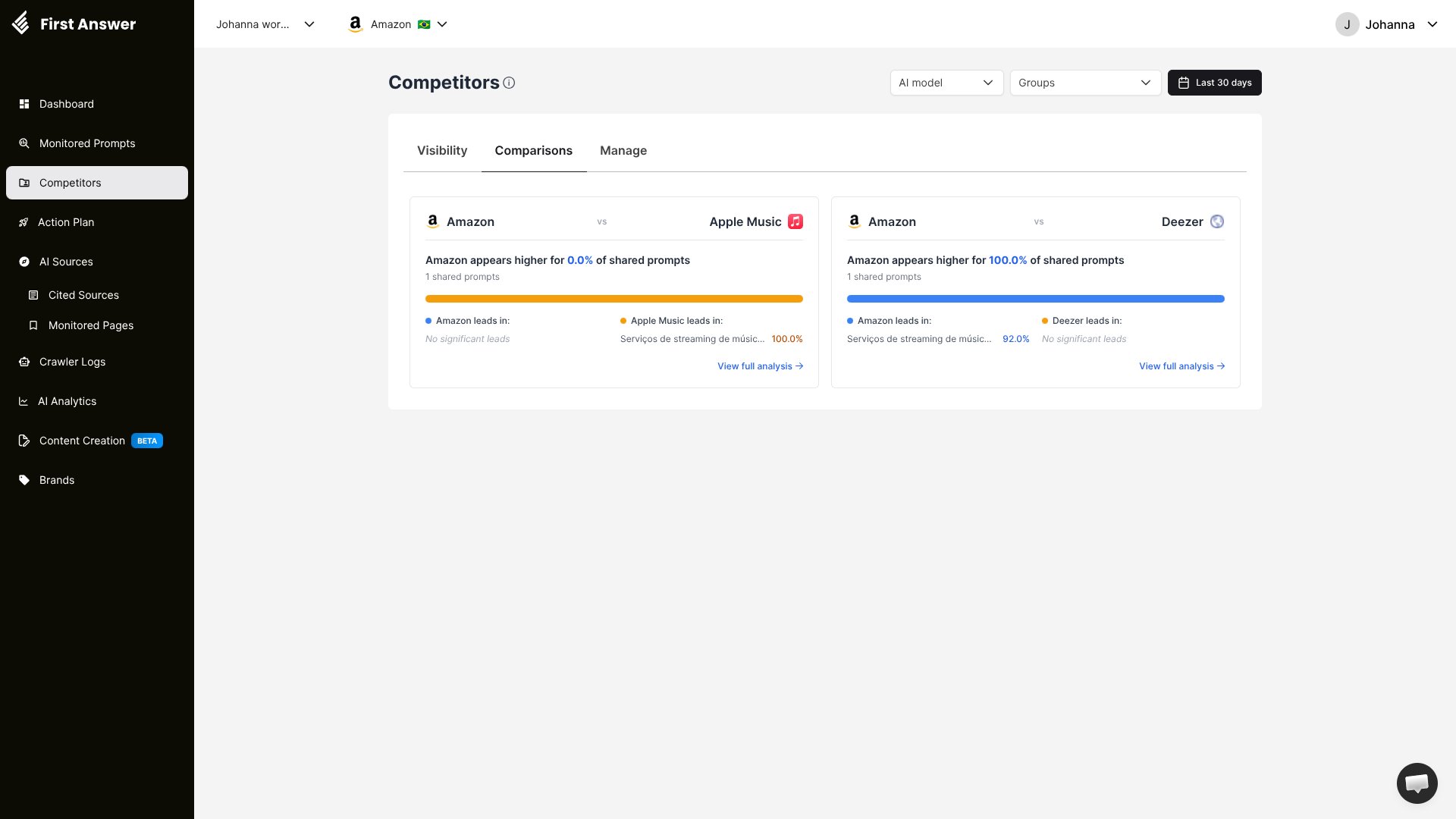 Each card summarizes:
* **The share of shared prompts where your brand appears higher** than that competitor.
* **How many prompts you share** (prompts where both brands are mentioned).
* **Which topics each brand leads in**, with the leading percentage.
### Full analysis
Click **View full analysis** on a card to open a detailed, prompt-by-prompt breakdown:
Each card summarizes:
* **The share of shared prompts where your brand appears higher** than that competitor.
* **How many prompts you share** (prompts where both brands are mentioned).
* **Which topics each brand leads in**, with the leading percentage.
### Full analysis
Click **View full analysis** on a card to open a detailed, prompt-by-prompt breakdown:
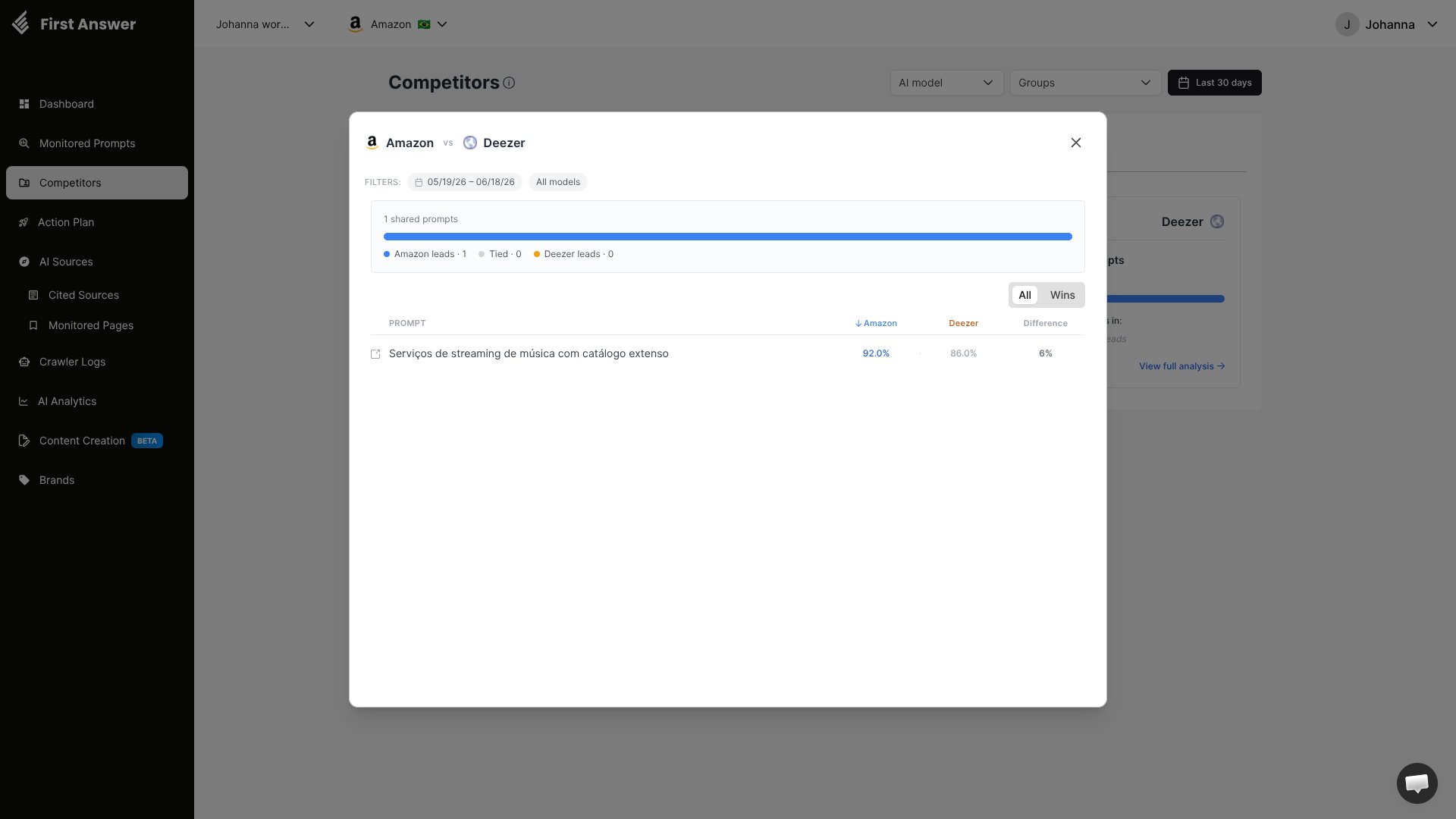 The modal shows:
* The active **date range** and **AI model** filters.
* A summary of how many shared prompts your brand **leads**, are **tied**, and the competitor **leads**.
* A toggle to switch between **All** shared prompts and just your **Wins** (or **Losses**) so you can focus on where to defend or improve.
* A table with each shared prompt and the visibility score for your brand, the competitor, and the **difference** between them.
## Manage
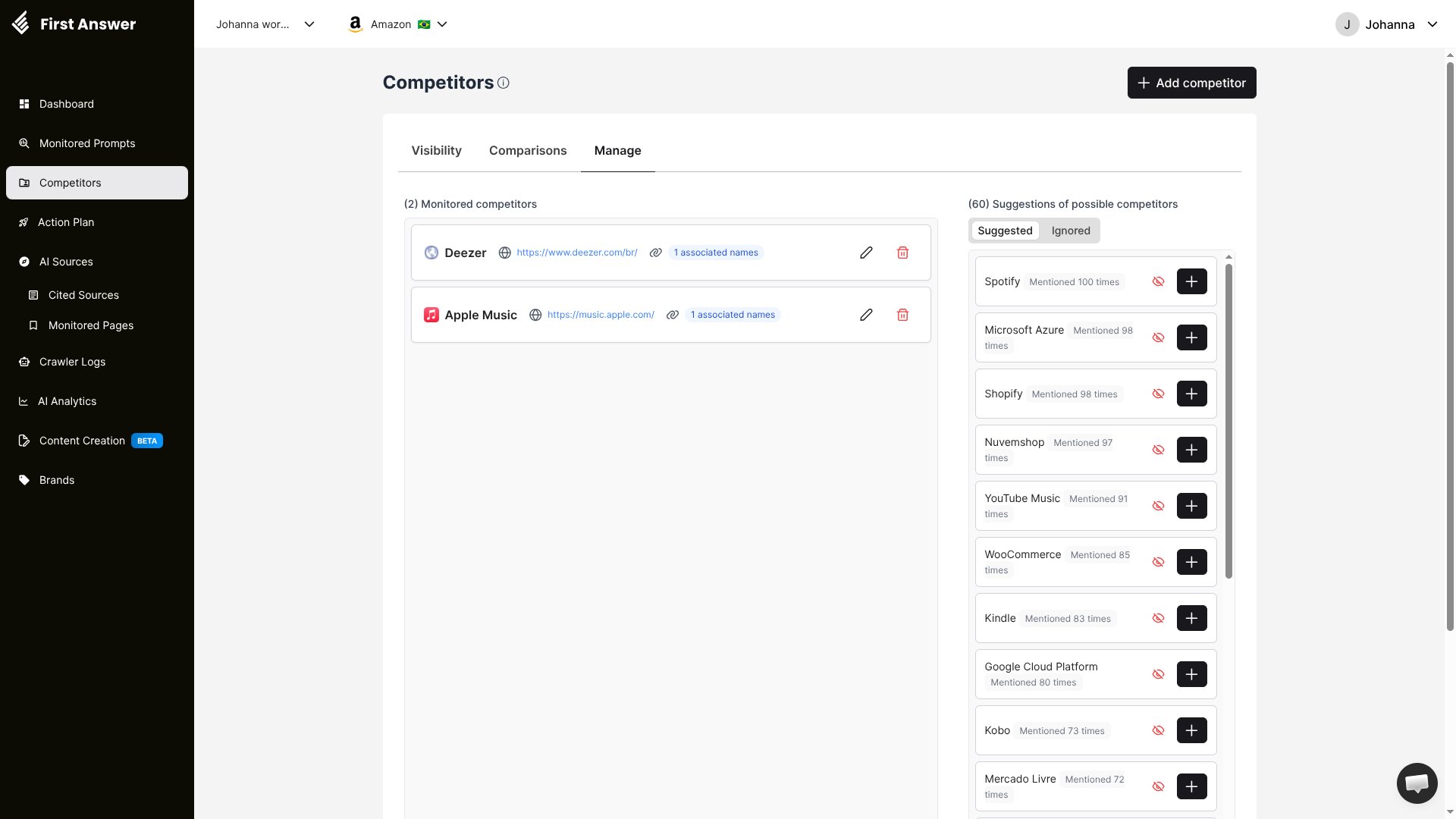
The **Manage** tab is where you curate who you track. Use **+ Add competitor** at the top right to start tracking a new brand.
The modal shows:
* The active **date range** and **AI model** filters.
* A summary of how many shared prompts your brand **leads**, are **tied**, and the competitor **leads**.
* A toggle to switch between **All** shared prompts and just your **Wins** (or **Losses**) so you can focus on where to defend or improve.
* A table with each shared prompt and the visibility score for your brand, the competitor, and the **difference** between them.
## Manage
The **Manage** tab is where you curate who you track. Use **+ Add competitor** at the top right to start tracking a new brand.
 ### Monitored competitors
The left panel lists the competitors you currently track. For each one you can see:
* **Name** — the competitor brand name.
* **Website** — the competitor's URL.
* **Associated names** — alternative names or variations the AI might use for this competitor.
* **Actions** — edit competitor details or remove them from tracking.
#### Associated names
AI models may reference a competitor using different names, abbreviations, or product names. Associated names ensure that all variations are captured and counted. For example, if you track "Microsoft," you might add associated names like "MS," "MSFT," or "Microsoft Corporation."
### Competitor suggestions
The right panel shows **AI-powered suggestions** for competitors you might want to track, generated from brands that frequently appear in the same AI responses as your monitored prompts. Each suggestion shows the brand name and how many times it was mentioned across all your responses.
Suggestions are split into two sub-tabs:
* **Suggested** — new brands worth considering. Click the **+** button to start tracking one.
* **Ignored** — brands you've dismissed. Use the **ignore** icon (the crossed-out eye) on any suggestion to move it here and keep your suggestions list focused.
Competitor suggestions are dynamic — they update as you collect more data. A brand that appears frequently in your AI responses is likely a meaningful competitor in the AI visibility space, even if you don't consider them a traditional competitor.
## How to use Competitor Monitoring
On the **Manage** tab, click **+ Add competitor** to add brands you want to track. Start with your most direct competitors — the brands users would consider as alternatives to yours.
After adding a competitor, click the edit icon to add associated names. This ensures all brand variations are captured in the analysis.
Check the **Suggested** list regularly. Add brands that appear often in your AI responses, and **ignore** the ones that aren't real competitors to keep the list relevant.
Use the **Visibility** tab to watch how your share of AI mentions trends over time and across models.
Open the **Comparisons** tab and **View full analysis** on a competitor to find the exact prompts where you trail, then prioritize content and optimization work there.
Don't limit yourself to traditional competitors. AI models may recommend brands from adjacent industries or emerging players you haven't considered. The suggestions panel is specifically designed to surface these non-obvious competitors.
### Monitored competitors
The left panel lists the competitors you currently track. For each one you can see:
* **Name** — the competitor brand name.
* **Website** — the competitor's URL.
* **Associated names** — alternative names or variations the AI might use for this competitor.
* **Actions** — edit competitor details or remove them from tracking.
#### Associated names
AI models may reference a competitor using different names, abbreviations, or product names. Associated names ensure that all variations are captured and counted. For example, if you track "Microsoft," you might add associated names like "MS," "MSFT," or "Microsoft Corporation."
### Competitor suggestions
The right panel shows **AI-powered suggestions** for competitors you might want to track, generated from brands that frequently appear in the same AI responses as your monitored prompts. Each suggestion shows the brand name and how many times it was mentioned across all your responses.
Suggestions are split into two sub-tabs:
* **Suggested** — new brands worth considering. Click the **+** button to start tracking one.
* **Ignored** — brands you've dismissed. Use the **ignore** icon (the crossed-out eye) on any suggestion to move it here and keep your suggestions list focused.
Competitor suggestions are dynamic — they update as you collect more data. A brand that appears frequently in your AI responses is likely a meaningful competitor in the AI visibility space, even if you don't consider them a traditional competitor.
## How to use Competitor Monitoring
On the **Manage** tab, click **+ Add competitor** to add brands you want to track. Start with your most direct competitors — the brands users would consider as alternatives to yours.
After adding a competitor, click the edit icon to add associated names. This ensures all brand variations are captured in the analysis.
Check the **Suggested** list regularly. Add brands that appear often in your AI responses, and **ignore** the ones that aren't real competitors to keep the list relevant.
Use the **Visibility** tab to watch how your share of AI mentions trends over time and across models.
Open the **Comparisons** tab and **View full analysis** on a competitor to find the exact prompts where you trail, then prioritize content and optimization work there.
Don't limit yourself to traditional competitors. AI models may recommend brands from adjacent industries or emerging players you haven't considered. The suggestions panel is specifically designed to surface these non-obvious competitors.