> ## Documentation Index
> Fetch the complete documentation index at: https://docs.firstanswer.ai/llms.txt
> Use this file to discover all available pages before exploring further.
# Cited Sources
> Discover which websites and domains AI models reference when generating responses to your monitored prompts.
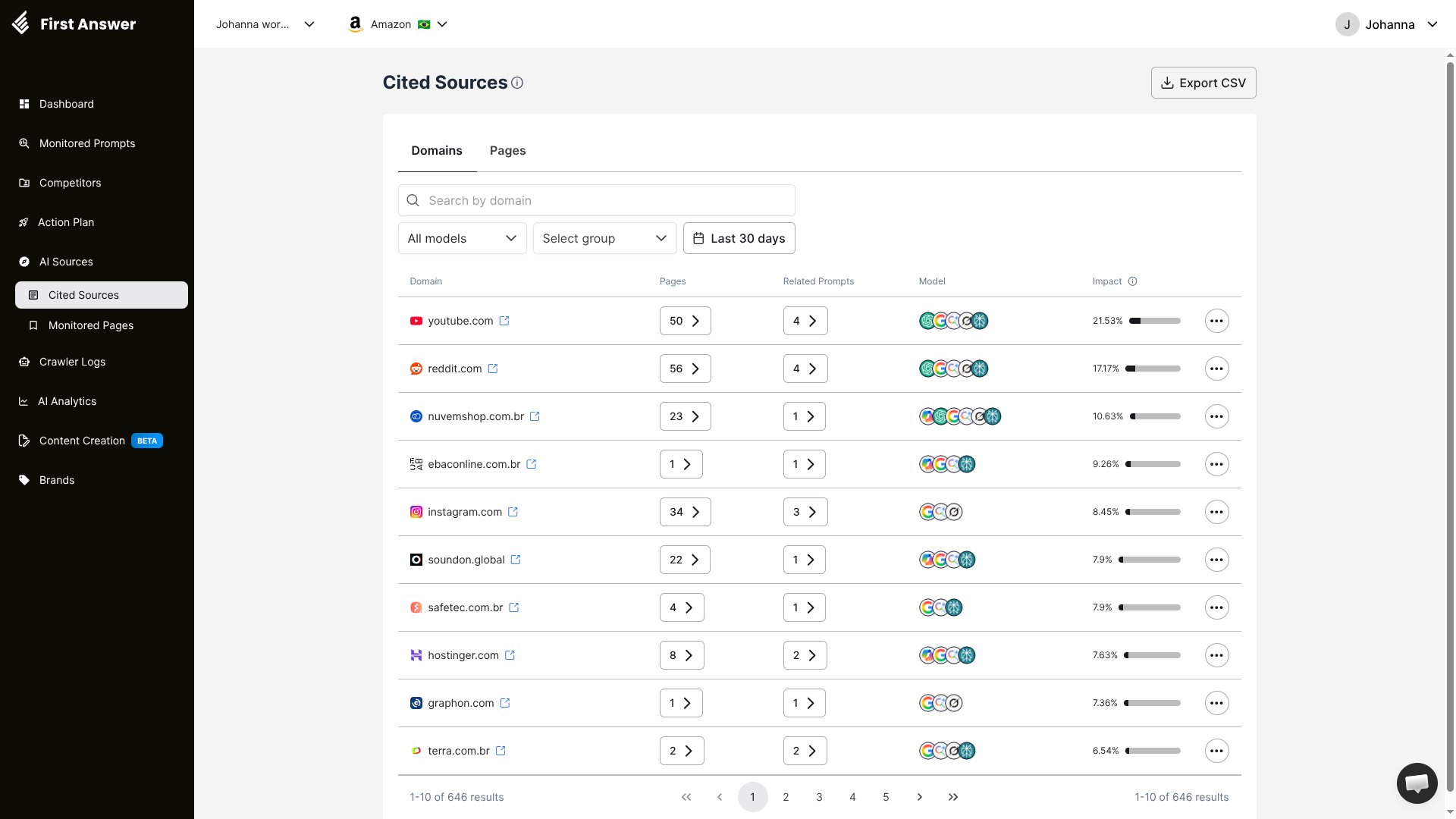 ## What are Cited Sources?
Cited Sources reveals which websites AI models reference when answering your monitored prompts. When ChatGPT, Perplexity, Gemini, or other AI models generate a response, they often cite or link to specific web pages as sources. Understanding these sources is critical because **the content AI cites directly influences what it recommends**.
If an AI model cites a page that mentions your competitor but not your brand, you are losing visibility at the source level. Cited Sources helps you identify these opportunities and take action.
## How it works
Every time First Answer collects an AI response, it extracts all cited URLs and domains. These are aggregated and ranked by impact — a proprietary score that reflects how much influence each source has on your brand's visibility across AI responses.
## Domains and Pages tabs
Cited Sources is split into two tabs that you can switch between freely, without reloading the data:
* **Domains** — the default view. Each row is a website domain, aggregated and ranked by impact.
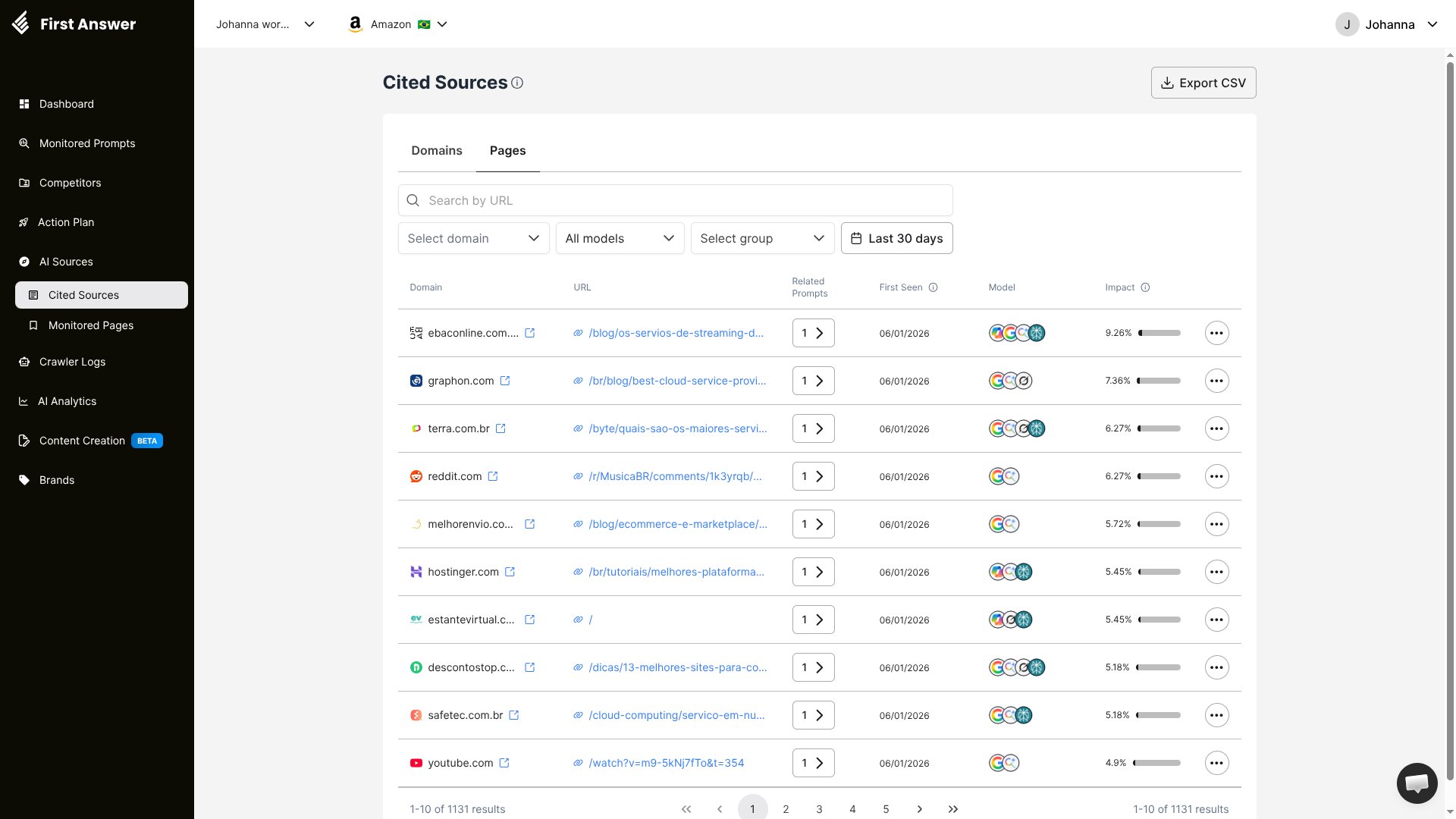
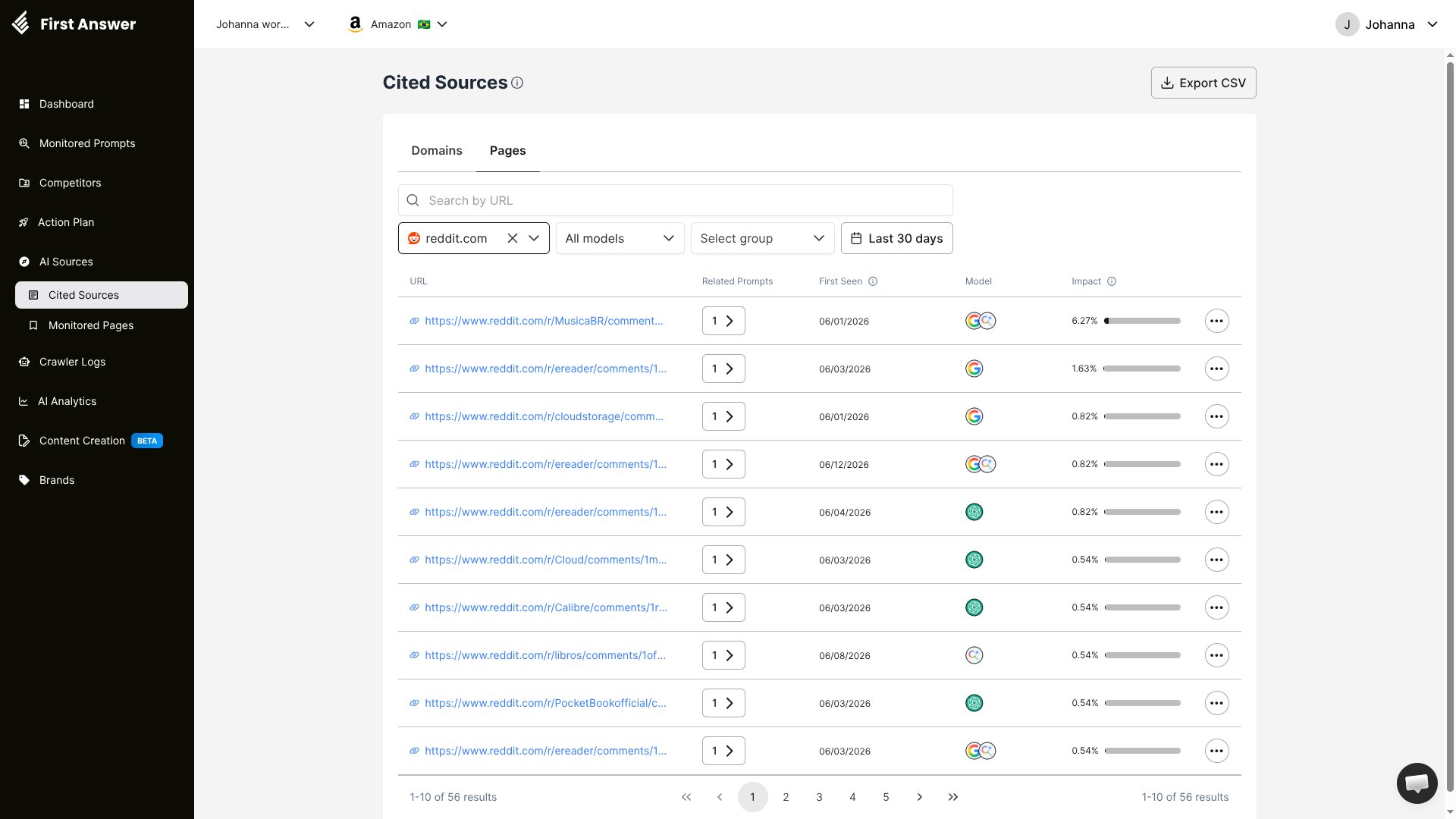
* **Pages** — the individual cited URLs. By default it is filtered to the domain you drilled in from, but you can clear the domain filter to see every cited page across all domains, or use the **domain selector** to switch to a different domain without leaving the tab.
The Pages tab presents its data differently depending on whether a domain filter is active:
* **No domain filter (all domains)** — the table includes a **Domain** column so you can tell sources apart, and the URL column shows the page path.
## What are Cited Sources?
Cited Sources reveals which websites AI models reference when answering your monitored prompts. When ChatGPT, Perplexity, Gemini, or other AI models generate a response, they often cite or link to specific web pages as sources. Understanding these sources is critical because **the content AI cites directly influences what it recommends**.
If an AI model cites a page that mentions your competitor but not your brand, you are losing visibility at the source level. Cited Sources helps you identify these opportunities and take action.
## How it works
Every time First Answer collects an AI response, it extracts all cited URLs and domains. These are aggregated and ranked by impact — a proprietary score that reflects how much influence each source has on your brand's visibility across AI responses.
## Domains and Pages tabs
Cited Sources is split into two tabs that you can switch between freely, without reloading the data:
* **Domains** — the default view. Each row is a website domain, aggregated and ranked by impact.
* **Pages** — the individual cited URLs. By default it is filtered to the domain you drilled in from, but you can clear the domain filter to see every cited page across all domains, or use the **domain selector** to switch to a different domain without leaving the tab.
The Pages tab presents its data differently depending on whether a domain filter is active:
* **No domain filter (all domains)** — the table includes a **Domain** column so you can tell sources apart, and the URL column shows the page path.
 * **Filtered by a domain** — the **Domain** column drops away (every row shares the same domain) and the URL column expands to show the full address of each cited page.
 ## Understanding the table
The Domains tab shows the following columns:
| Column | Description |
| ------------------- | ------------------------------------------------------------------------------------ |
| **Domain** | The website domain (e.g., reddit.com, linkedin.com, semrush.com) |
| **Pages** | The number of unique pages from this domain that have been cited |
| **Related Prompts** | How many of your monitored prompts have responses that cite this domain |
| **Model** | Which AI models cite this source (shown as model icons) |
| **Impact** | A percentage score reflecting the source's influence on AI responses to your prompts |
### Impact score
The Impact score is one of the most valuable metrics in First Answer. It quantifies how much a specific domain influences AI-generated responses for your monitored prompts. A higher impact means:
* The domain is cited more frequently
* It appears across more prompts and models
* Responses that cite this domain are more likely to shape AI opinions about your industry
Reddit, LinkedIn, and YouTube are consistently among the most cited sources across AI models. Having your brand mentioned on these platforms can significantly boost your AI visibility.
## Filters
You can refine the Cited Sources view with:
* **Search by domain**: Find a specific domain quickly
* **AI model**: Filter to see which sources a specific AI model cites
* **Group**: Filter by prompt group to see sources relevant to specific topics
* **Date range**: See how source citations change over time
## Key concepts
### Why cited sources matter
AI models do not generate responses from nothing. They rely on training data and, increasingly, on real-time web content. When an AI model cites a source, it is signaling that it trusts that content to inform its answer. If you want to appear in AI responses, you need to be present in the sources that AI models trust.
### Domains vs. pages
A domain like `reddit.com` may have hundreds of cited pages. There are two ways to reach them:
* From the **Domains** tab, click a domain's page count to open the **Pages** tab pre-filtered to that domain.
* Open the **Pages** tab directly, then use the **domain selector** to filter by any domain — or clear it to see every cited URL across all domains in one list.
Because the domain selector lives on the Pages tab, you can switch the domain you are inspecting without going back to the Domains view. This level of detail helps you understand:
* Which Reddit threads mention your competitors
* Which blog posts on industry sites drive AI recommendations
* Where you need to create or optimize content
### Filters persist as you navigate
When you open a page's details, your filters travel with you:
* The date range you set on Cited Sources carries into the page detail view, so you stay within the same time window.
* When you go back — using your browser or the breadcrumb — your filters are preserved, so you don't lose your place or have to reapply them.
### Cross-model citations
The Model column shows which AI platforms cite each source. Some sources are universally cited (appearing across all models), while others are model-specific. This helps you prioritize sources that influence the broadest set of AI models.
## How to use Cited Sources
Sort by Impact to find the domains that most influence AI responses for your prompts. Focus on the top 10-20 sources.
For each high-impact source, visit the cited pages and check if your brand is mentioned. If not, this is a visibility gap.
Get your brand mentioned on high-impact sources. This could mean writing guest posts, participating in Reddit discussions, publishing on LinkedIn, or creating content that these sources reference.
Return to Cited Sources regularly to see if new sources emerge or if existing sources gain or lose influence.
Click **Export CSV** to download the full list of cited sources for deeper analysis or sharing with your content team.
Focus on sources that are cited across multiple AI models (shown with multiple model icons). Getting your brand mentioned on these universally trusted sources gives you the broadest visibility boost.
## Understanding the table
The Domains tab shows the following columns:
| Column | Description |
| ------------------- | ------------------------------------------------------------------------------------ |
| **Domain** | The website domain (e.g., reddit.com, linkedin.com, semrush.com) |
| **Pages** | The number of unique pages from this domain that have been cited |
| **Related Prompts** | How many of your monitored prompts have responses that cite this domain |
| **Model** | Which AI models cite this source (shown as model icons) |
| **Impact** | A percentage score reflecting the source's influence on AI responses to your prompts |
### Impact score
The Impact score is one of the most valuable metrics in First Answer. It quantifies how much a specific domain influences AI-generated responses for your monitored prompts. A higher impact means:
* The domain is cited more frequently
* It appears across more prompts and models
* Responses that cite this domain are more likely to shape AI opinions about your industry
Reddit, LinkedIn, and YouTube are consistently among the most cited sources across AI models. Having your brand mentioned on these platforms can significantly boost your AI visibility.
## Filters
You can refine the Cited Sources view with:
* **Search by domain**: Find a specific domain quickly
* **AI model**: Filter to see which sources a specific AI model cites
* **Group**: Filter by prompt group to see sources relevant to specific topics
* **Date range**: See how source citations change over time
## Key concepts
### Why cited sources matter
AI models do not generate responses from nothing. They rely on training data and, increasingly, on real-time web content. When an AI model cites a source, it is signaling that it trusts that content to inform its answer. If you want to appear in AI responses, you need to be present in the sources that AI models trust.
### Domains vs. pages
A domain like `reddit.com` may have hundreds of cited pages. There are two ways to reach them:
* From the **Domains** tab, click a domain's page count to open the **Pages** tab pre-filtered to that domain.
* Open the **Pages** tab directly, then use the **domain selector** to filter by any domain — or clear it to see every cited URL across all domains in one list.
Because the domain selector lives on the Pages tab, you can switch the domain you are inspecting without going back to the Domains view. This level of detail helps you understand:
* Which Reddit threads mention your competitors
* Which blog posts on industry sites drive AI recommendations
* Where you need to create or optimize content
### Filters persist as you navigate
When you open a page's details, your filters travel with you:
* The date range you set on Cited Sources carries into the page detail view, so you stay within the same time window.
* When you go back — using your browser or the breadcrumb — your filters are preserved, so you don't lose your place or have to reapply them.
### Cross-model citations
The Model column shows which AI platforms cite each source. Some sources are universally cited (appearing across all models), while others are model-specific. This helps you prioritize sources that influence the broadest set of AI models.
## How to use Cited Sources
Sort by Impact to find the domains that most influence AI responses for your prompts. Focus on the top 10-20 sources.
For each high-impact source, visit the cited pages and check if your brand is mentioned. If not, this is a visibility gap.
Get your brand mentioned on high-impact sources. This could mean writing guest posts, participating in Reddit discussions, publishing on LinkedIn, or creating content that these sources reference.
Return to Cited Sources regularly to see if new sources emerge or if existing sources gain or lose influence.
Click **Export CSV** to download the full list of cited sources for deeper analysis or sharing with your content team.
Focus on sources that are cited across multiple AI models (shown with multiple model icons). Getting your brand mentioned on these universally trusted sources gives you the broadest visibility boost.