> ## Documentation Index
> Fetch the complete documentation index at: https://docs.firstanswer.ai/llms.txt
> Use this file to discover all available pages before exploring further.
# Brands
> Manage multiple brands from a single account — each with its own prompts, competitors, and visibility tracking.
 ## What are Brands?
Brands lets you manage multiple brands, products, or business units from a single First Answer account. Each brand operates as an independent workspace with its own set of monitored prompts, competitors, cited sources, and analytics.
This is essential for agencies managing client brands, enterprises with multiple product lines, or businesses operating in different markets.
## How it works
When you create a brand in First Answer, you define:
* **Brand name**: The primary name AI models should recognize
* **Description**: A brief description that helps First Answer understand your brand's context and industry
* **Country/Region**: The primary market for this brand, which influences how prompts are executed and analyzed
All other features (Dashboard, Monitored Prompts, Competitors, etc.) operate within the context of the currently selected brand. You can switch between brands using the brand selector in the top navigation bar.
## Brand list
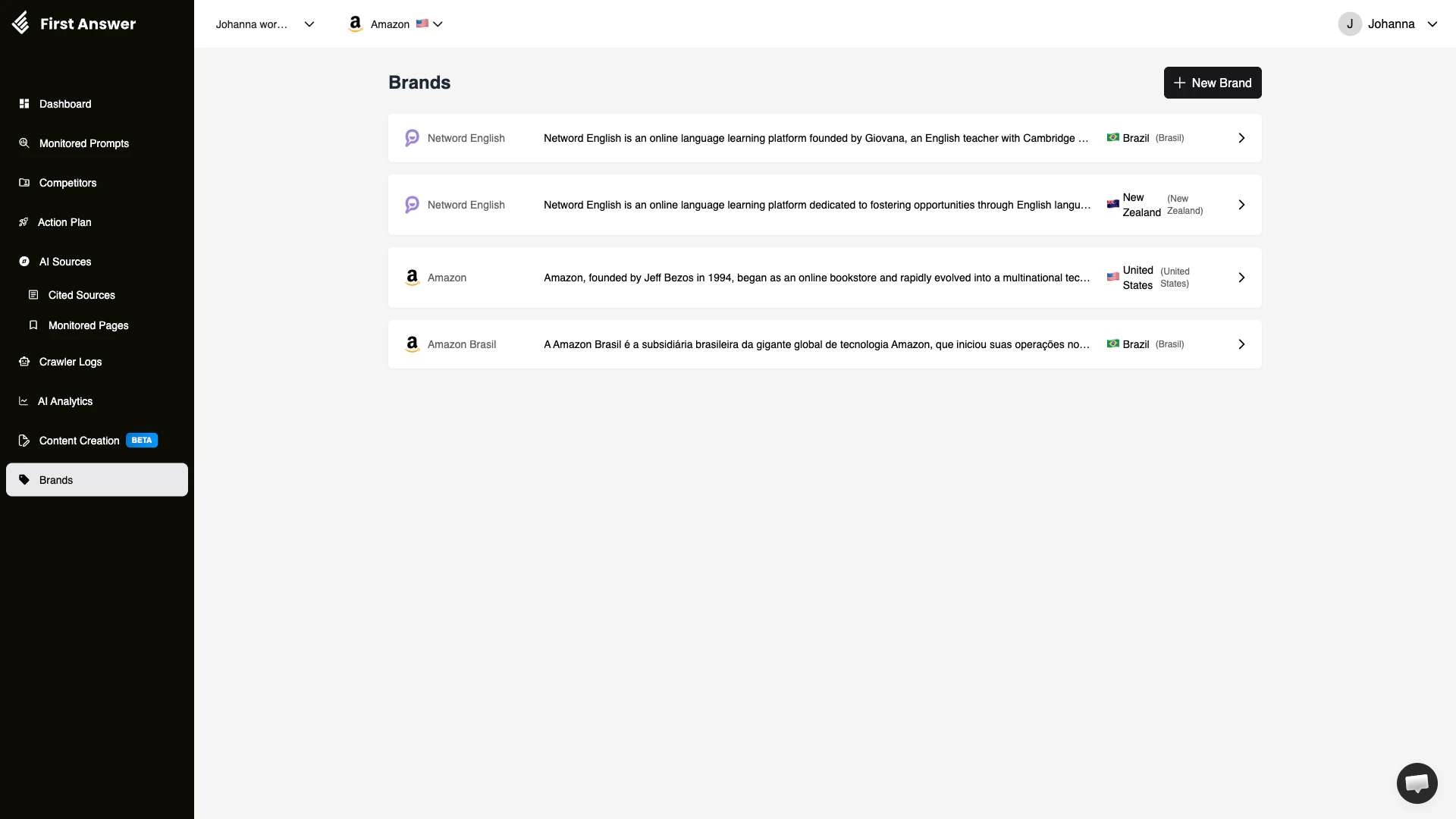
The Brands page shows all brands in your account. For each brand, you can see:
* **Brand icon**: A visual identifier (typically the brand's favicon)
* **Brand name**: The primary name
* **Description**: A summary of what the brand is about
* **Country**: The primary market with country flag
* **Region**: Additional geographic context
## Key concepts
### Brand context
Every metric, prompt, and analysis in First Answer is scoped to a specific brand. When you switch brands in the top navigation, the entire interface updates to show data relevant to that brand. This means:
* The Dashboard shows metrics for the selected brand
* Monitored Prompts are specific to the selected brand
* Competitors are tracked relative to the selected brand
* Cited Sources reflect what AI models cite when your selected brand's prompts are executed
### Multi-brand strategy
Managing multiple brands lets you:
* **Compare strategies**: See which content or SEO approaches work better for different brands
* **Share learnings**: If one brand achieves high visibility for a certain type of prompt, apply that strategy to other brands
* **Segment markets**: Track the same brand across different countries or languages
### Brand description quality
The brand description you provide matters. First Answer uses it to better understand your brand context, which improves the accuracy of:
* Sentiment analysis (understanding whether a mention is positive or negative)
* Competitor suggestions (recommending relevant competitors)
* Action plan recommendations (generating relevant content suggestions)
Write brand descriptions that clearly explain what your company does, who your customers are, and what makes you different. The more context you provide, the more accurate your analysis will be.
## How to use Brands
Click **+ New Brand** and fill in your brand details. Include a thorough description that covers your industry, products, and target audience.
After creating a brand, switch to it using the brand selector. Then set up [Monitored Prompts](/features/monitored-prompts) and [Competitors](/features/competitors) for that brand.
For agencies or multi-product companies, repeat the process for each brand you want to track.
Use the brand selector dropdown in the top navigation bar to switch between brands. The entire interface updates to show data for the selected brand.
If you manage brands across different countries, create separate brand entries for each market. AI model behavior and citations vary significantly by language and region.
## What are Brands?
Brands lets you manage multiple brands, products, or business units from a single First Answer account. Each brand operates as an independent workspace with its own set of monitored prompts, competitors, cited sources, and analytics.
This is essential for agencies managing client brands, enterprises with multiple product lines, or businesses operating in different markets.
## How it works
When you create a brand in First Answer, you define:
* **Brand name**: The primary name AI models should recognize
* **Description**: A brief description that helps First Answer understand your brand's context and industry
* **Country/Region**: The primary market for this brand, which influences how prompts are executed and analyzed
All other features (Dashboard, Monitored Prompts, Competitors, etc.) operate within the context of the currently selected brand. You can switch between brands using the brand selector in the top navigation bar.
## Brand list
The Brands page shows all brands in your account. For each brand, you can see:
* **Brand icon**: A visual identifier (typically the brand's favicon)
* **Brand name**: The primary name
* **Description**: A summary of what the brand is about
* **Country**: The primary market with country flag
* **Region**: Additional geographic context
## Key concepts
### Brand context
Every metric, prompt, and analysis in First Answer is scoped to a specific brand. When you switch brands in the top navigation, the entire interface updates to show data relevant to that brand. This means:
* The Dashboard shows metrics for the selected brand
* Monitored Prompts are specific to the selected brand
* Competitors are tracked relative to the selected brand
* Cited Sources reflect what AI models cite when your selected brand's prompts are executed
### Multi-brand strategy
Managing multiple brands lets you:
* **Compare strategies**: See which content or SEO approaches work better for different brands
* **Share learnings**: If one brand achieves high visibility for a certain type of prompt, apply that strategy to other brands
* **Segment markets**: Track the same brand across different countries or languages
### Brand description quality
The brand description you provide matters. First Answer uses it to better understand your brand context, which improves the accuracy of:
* Sentiment analysis (understanding whether a mention is positive or negative)
* Competitor suggestions (recommending relevant competitors)
* Action plan recommendations (generating relevant content suggestions)
Write brand descriptions that clearly explain what your company does, who your customers are, and what makes you different. The more context you provide, the more accurate your analysis will be.
## How to use Brands
Click **+ New Brand** and fill in your brand details. Include a thorough description that covers your industry, products, and target audience.
After creating a brand, switch to it using the brand selector. Then set up [Monitored Prompts](/features/monitored-prompts) and [Competitors](/features/competitors) for that brand.
For agencies or multi-product companies, repeat the process for each brand you want to track.
Use the brand selector dropdown in the top navigation bar to switch between brands. The entire interface updates to show data for the selected brand.
If you manage brands across different countries, create separate brand entries for each market. AI model behavior and citations vary significantly by language and region.